


Meitu
4.57.57K Reviews
App Specs
- Version
- 12.15.6
- Updated On
- License
- Free
- Downloads
- 100,000,000+
- Developer
- Meitu (China) Limited
- Categories
- Photography
- Platform
- Android, iOS
Screenshots


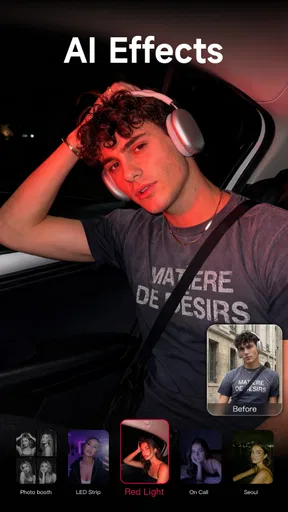
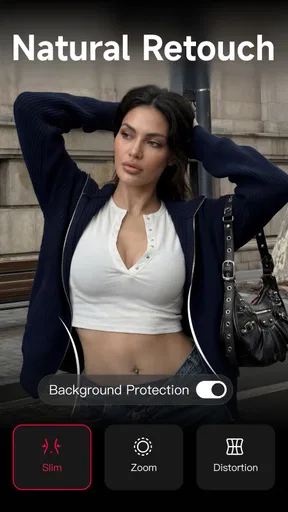
 Analysis by AppCompare
If you’re opening Meitu for the first time, I’d treat it less like a photo app you need to master and more like a small creative toolkit: pick one picture, make one change, and see whether the result feels like you. That simple approach helps you avoid the common trap of trying every effect at once. My best first result came from starting with a portrait and making a restrained edit rather than stacking filters and retouching until the image stopped looking natural.
What to expect from a portrait-first editor
Meitu is a photography app from Meitu (China) Limited, and its focus is easy to understand: it gives you ways to polish portraits, change the mood of an image, and make visual content without moving between several separate tools. It’s free to install, rated Teen, and has reached over 100 million installs. Its average rating is 4.6 from around 1.4 million ratings, with about 7,500 written reviews. Those figures suggest a widely used app, but the more useful question is whether its portrait-led approach fits the way you like to edit.
I’d recommend it to someone who wants a quick, expressive result for a selfie, a casual portrait, or a short social post. If you mainly want precise control over color, exposure, and a consistent look across a large batch of photographs, a more traditional photo editor may feel more comfortable. Meitu leans toward visible transformations and approachable effects; that can be a strength when you want personality, and a drawback when you want every adjustment to stay subtle.
Getting from install to a first good edit
When I’m starting with any editor, I choose a photo with even lighting and a clear face. That makes it easier to judge what a retouch or enhancement is actually doing. In Meitu, I’d begin with one enhancement or filter, pause to compare the edited image with the original, and only then decide whether to touch up details. A side-by-side check is a useful safeguard: if skin texture, facial shape, or the overall color changes more than you intended, back off before adding another effect.
For a first meaningful success, try making a portrait look a little brighter and more polished while keeping recognisable details intact. Save or share only after checking the image at full size, not just in the editor’s preview. Small changes can look dramatic on a phone screen, and a result that seems smooth at thumbnail size may feel overdone when viewed closely. That check is especially helpful if the picture is for a profile or a family group rather than a playful post.
Choosing effects without losing the original feel
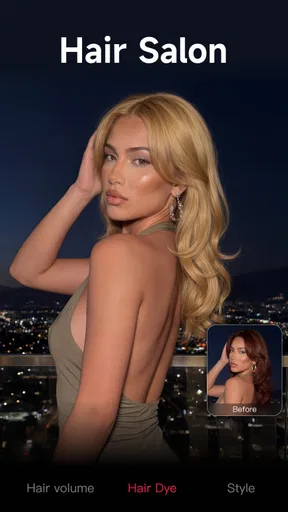
Filters are most useful when I treat them as a starting point, not a decision I have to accept unchanged. A filter can give a portrait a coherent mood quickly, but it may also shift skin tones or make a bright background compete with the subject. I’d test a couple of looks on the same image, then settle on the one that keeps the face readable and the scene believable. If the photo already has strong lighting or color, a lighter touch usually works better than adding a dramatic treatment.
Beauty retouching is where personal preference matters most. Smoothing or eye enhancement can help with a quick portrait, but reshaping facial features can make a familiar face look less like itself. I’d use those controls sparingly, especially on photos meant to be shared with people who know the subject. The practical advantage is that you can aim for a tidy, camera-ready result; the trade-off is that easy adjustments can tempt you to keep changing details long after the picture already looks good.
Worth Reading Before You Choose

Baby Panda World Brings Quick Play to Modern Phones, but Its Game Library Feels Busy

ESPN’s Live Game View Makes Following Close Games Easier

QuizzLand Review: A Good Fit for Short Trivia Breaks, Not Every Player

Basketball Stars: Multiplayer Is Fast, but Can It Recover When Matches Go Wrong?

WEBTOON Turns Phone Updates Into a Better Reading Routine

Link to Windows Runs on Shared Habits, Not Social Feeds
Where video fits into the workflow
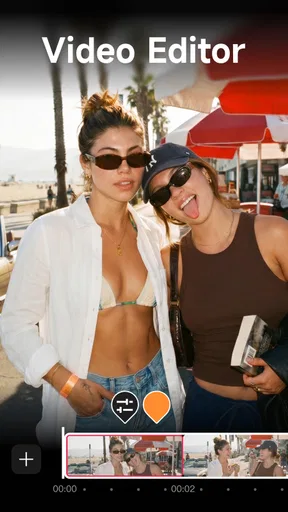
Meitu also includes video editing, so it can be handy when you want to make a short clip feel more finished without switching apps. Music, text, and transitions are useful for a simple birthday montage, a travel snippet, or a quick recap for friends. I’d keep the first project short and decide on its main purpose before adding decorations: a caption should help explain the clip, and a transition should make a cut easier to follow rather than draw attention away from the moment.
For a regular day-to-day example, imagine taking a few photos at a café and filming a short clip while catching up with a friend. I’d choose one portrait for a gentle filter, leave the background close to its original color, and use a short video edit only if the clip adds something the still image cannot. That keeps the process quick and gives the finished post a consistent feel without turning a casual memory into a heavily produced project.
How it compares with other editing choices
Compared with a basic phone gallery editor, Meitu gives you a more expressive set of portrait and style options in one place. Compared with a traditional editor built around detailed tonal adjustments, its appeal is less about carefully tuning every part of the image and more about reaching an attractive result with accessible tools. Neither approach is automatically better: I’d choose Meitu for a quick selfie makeover or playful visual treatment, and a more control-focused editor when accurate color, restrained correction, or repeatable edits matter more than speed.
That distinction also helps answer whether it is worth trying if you already have an editor. If your current app handles cropping, light correction, and occasional filters well, there may be no reason to move your whole routine. Meitu makes more sense as an additional option when you want portrait-focused retouching or a more stylized finish. It is not the choice I’d make for someone who dislikes beauty effects, wants a strictly natural look, or prefers a minimal toolset with little temptation to experiment.
First Impressions
When you first open Meitu- AI Photo & Video Editor, you’re greeted with a clean, user-friendly interface. It’s not cluttered with unnecessary buttons or features, which I really appreciate. Navigating through the app feels intuitive, making it perfect for both beginners and seasoned photo editors alike.
The app offers a quick tutorial that guides you through its core features, but honestly, it's so straightforward that you'll probably find yourself diving right in. The layout is sleek, and the color scheme is easy on the eyes, making editing a pleasant experience.
Features Galore
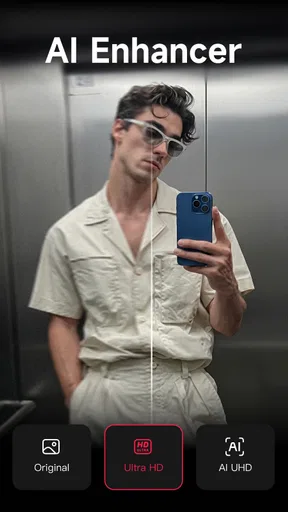
Now, let’s dive into what makes this app stand out. The range of editing tools is impressive. Whether you want to do a quick touch-up or a major overhaul, Meitu has got you covered. The AI-powered enhancements are a game-changer. With just one tap, your photos can go from "meh" to "wow" in seconds.
- Filters: There’s a filter for every mood. From vintage vibes to modern aesthetics, you’ll find something that suits your style.
- Beauty Retouch: Perfect for selfies, this feature allows you to smooth skin, enhance eyes, and even reshape facial features if you’re feeling adventurous.
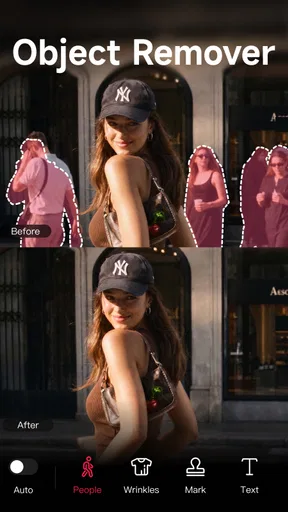
- Background Change: Ever wanted to be on a beach without leaving your room? This tool makes it happen with surprisingly realistic results.
- Video Editing: It's not just about photos. The video editing capabilities are also robust, allowing you to add music, text, and transitions effortlessly.
AI Magic
One of the coolest things about Meitu is how seamlessly it integrates AI into its features. The AI Portrait feature, for instance, is like having a professional photographer guiding you. It automatically suggests enhancements to make your photos pop.
The app’s AI is also smart enough to detect different elements in your photos, such as skies, water, or greenery, and apply tailored effects to each section. This means you get a perfectly balanced edit without the hassle of doing it manually.
Creative Community
Another aspect worth mentioning is the community feature. You can share your creations and get inspired by what others are doing. It’s a vibrant space where creativity flows, and you can pick up tips and tricks from fellow users. Plus, the app occasionally hosts contests, which is a fun way to challenge yourself and gain exposure.
Ending Thoughts
All in all, Meitu- AI Photo & Video Editor is a fantastic tool for anyone looking to enhance their photos and videos with ease. It's packed with features that cater to both casual users and those with a keen eye for detail. The AI elements are particularly noteworthy, making your editing process not just easier but also much more fun.
There is one practical detail I’d check before settling into a regular workflow: Meitu is free to download, but it also offers in-app purchases, with items ranging from about 49 cents to around $230. You can try the app without paying, yet it’s sensible to look at the price shown for any extra you choose before confirming a purchase. The current version is 12.2.9, and it supports devices running Android 8.0 or later; if your phone is older, check compatibility before planning to use it.
I’d also think about how you want to handle finished images. For something casual, the editing flow can be as simple as choosing a photo, making a small adjustment, checking it at full size, and sharing the result. For an image you may want to revise later, keep the untouched original available in your photo library. That gives you a clean fallback if an edit feels too strong after a few days or you want to try a different style.
So, if you’re ready to take your photos and videos to the next level, give Meitu a try. It’s like having a little magic wand for your media, and who doesn’t want a bit of magic in their lives? My recommendation is to begin with one portrait and one modest change, then decide whether the app’s playful, beauty-focused style suits you. If it does, there’s room to explore; if you prefer careful manual control or unedited images, your usual editor may remain the better everyday choice.
Pros
- Intuitive interface for easy editing.
- Wide range of AI filters and effects.
- High-quality output for photos and videos.
- Frequent updates with new features.
- Supports multiple languages.
Cons
- Some features require a subscription.
- Heavy on device storage usage.
- Occasional ads can be intrusive.
- Limited free version capabilities.
- Requires stable internet for AI tools.
FAQs for Meitu
What features does Meitu offer for photo editing?
Meitu provides a wide range of photo editing features, including AI-driven enhancements, beautification tools, filters, and effects. Users can easily adjust lighting, remove blemishes, and even reshape facial features. Additionally, the app offers artistic effects like cartoon filters and a variety of makeup options to enhance portraits.
Is Meitu available for both Android and iOS platforms?
Yes, Meitu is available for download on both Android and iOS devices. The app is designed to perform seamlessly across different platforms, ensuring that users can enjoy its features regardless of their device. You can find Meitu on the Google Play Store and the Apple App Store.
Does Meitu offer video editing capabilities?
Meitu includes video editing features that allow users to enhance their videos with filters, transitions, and music. The app supports basic editing functions such as trimming and merging clips, alongside more advanced features like AI enhancements and beautification for video content.
Are there any costs associated with using Meitu?
Meitu offers a free version with a wide array of features; however, it also provides a premium subscription that unlocks additional tools and effects. The premium version removes ads and gives access to exclusive content, allowing users to maximize their editing potential.
How does Meitu ensure user privacy and data security?
Meitu takes user privacy seriously, implementing strict data protection measures. The app requests necessary permissions for its functionality but ensures that personal information is not misused. Users can review the app's privacy policy for detailed information on data handling practices.


